- DATE:
- AUTHOR:
- Team LaunchNotes
- RELATED ROADMAP ITEMS:
- Smart Draft - AI Enhancements for Announcements
Introducing Smart Draft: The New Unified Way to Draft Announcements
Most teams collect drafts from multiple PMs, paste them into an AI ChatBot, and manually reformat the output to match their brand voice and style. That workflow leaks content to consumer AI tools, diminishes your brand voice, and creates extra work for whoever’s cleaning it up.
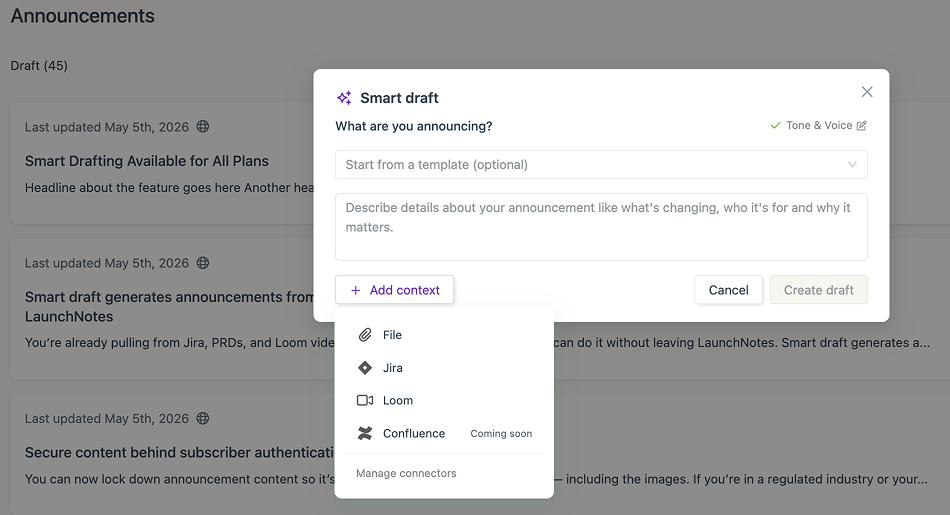
Smart Draft consolidates the LaunchNotes AI drafting path into a single experience. Drop in whatever source material you’re working from — Jira tickets, Loom recordings, PRD files, rough prompts — and get a structured draft in one step.
Key features of Smart Draft
All sources, one step: Jira issues, Loom videos, file uploads (PDF, .txt, .csv), and text prompts all flow through the same interface
File attachment support: Upload specs, PRDs, or exported docs up to 10 MB — Smart Draft extracts the text and uses it as reference material
Template-aware generation: Start from a template and Smart Draft honors its structure, categories, and required sections automatically
Premium Tone & Voice: Define your organization’s voice once at the project level, and every draft inherits it — no manual cleanup, no generic AI output (Premium & Enterprise plans only)
Why it matters
Smart Draft keeps everything inside LaunchNotes. Your source material stays in your AWS tenancy via Bedrock — prompts aren’t retained or used for training. Jira epics and Loom transcripts attach natively. And if you’ve configured Tone & Voice, every draft sounds like one brand, even when eight different people are feeding inputs.
The result: announcements that are faster to write and need less editing before they’re ready to publish.
How it works
Open Smart Draft when you create a new announcement. Add your source material — as much or as little context as you have. Mix and match:
Your prompt: Write the announcement in your own words, or give Smart Draft instructions
Files: Drop in a PRD, tech spec, or PDF
Jira issues: Attach the epics, stories, or bugs that represent the shipped work — Smart Draft reads titles and descriptions, and the finished announcement links back to each issue
Loom or Vidyard videos: Paste a URL and Smart Draft pulls the transcript
Click Create draft and you’re done.
If you start from a template, Smart Draft inherits its section structure, categories, roadmap items, and hero image. If your organization has a Tone & Voice profile configured, it’s applied automatically.
Setting up Tone & Voice for Smart Draft
Tone & Voice is a project-level prompt that tells Smart Draft who you’re writing for and how your brand sounds. Write it once, and every draft from every teammate inherits it.
To configure it, go to Settings >> Customize Page >> click on the Tone & Voice tab. Define your audience, voice, and any rules you want applied to every announcement draft.
Tone & Voice is available on Premium and Enterprise plans. If you need help getting started, please send us a note at support@launchnotes.io
Try Smart Draft today
Smart Draft is available now. If you run into anything unexpected, have a source type you'd like to see supported, or just want to tell us what's working — we want to hear it. Drop us a feedback on this announcement. Thank you!