- DATE:
- AUTHOR:
- Team LaunchNotes
- RELATED ROADMAP ITEMS:
- Slack Bot Customization
- Embed Category Filtering
- Admin: Subscriber Management Enhancements
Subscriber Management That Scales, Communications That Connect
Today’s release introduces advanced subscriber filtering, bulk editing operations, embed widget category controls, and email/Slack customization features that give LaunchNotes publishers precise control over who sees what, when, and where.
Key features of the 2026.01.00 release
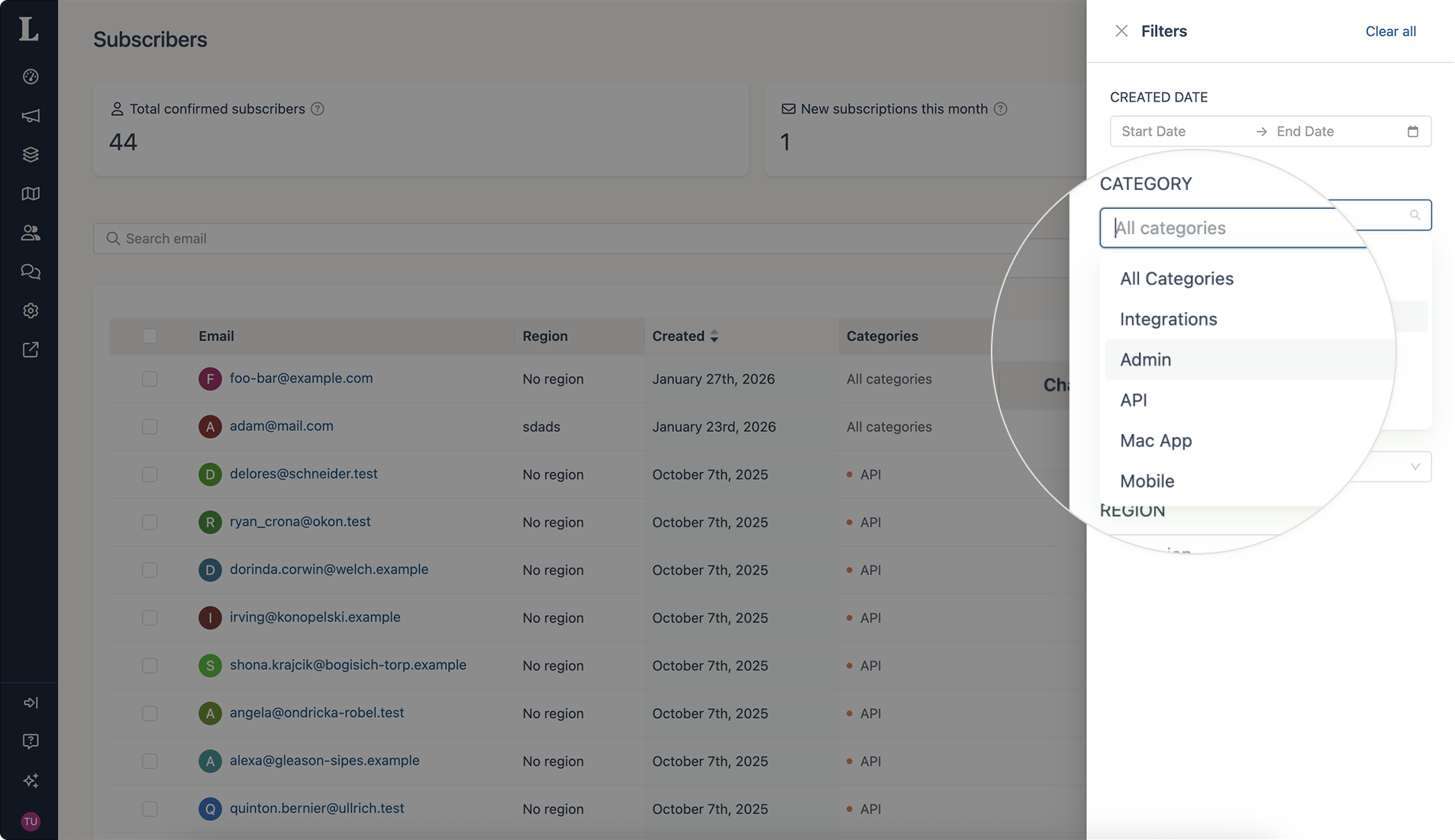
Advanced subscriber filtering by categories, regions, dates, and subscriber-states
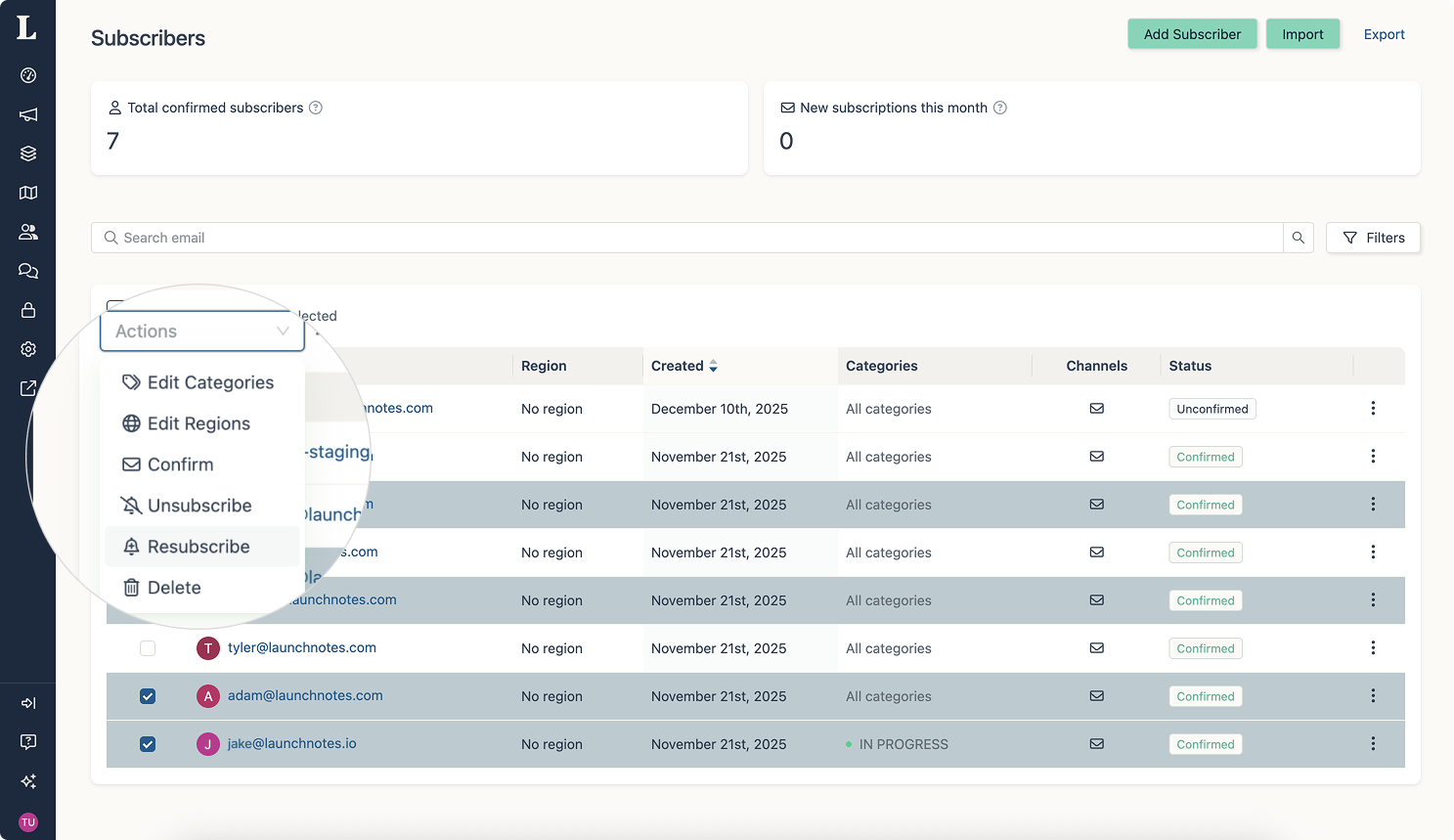
Bulk category and region updates with the actions of add/replace/clear
Add individual subscribers directly in the subscriber tab (CSV not required)
Category-based embed widget filtering
Table of Contents for email notifications now optional
Custom Slack bot channel branding and improved Slack message formatting
Find anyone, update everyone: subscriber management at scale
Managing subscriber base is dramatically more efficient. Our new filtering and bulk operations work together to transform data management tasks into minutes-long workflows.
Filter with precision: Slice through subscriber lists of any size by categories, regions, or date ranges—perfect for identifying subscriber-state cohorts or targeting specific segments.
Update at scale: Identify specific subscriber types and update them all at once. Add categories to hundreds of records, reassign regions, or clean up incomplete data across entire segments in a single operation. Choose the “Add” action to append categories, “Replace” action to swap them entirely, or “Clear” action to remove them.
Spend less time on repetitive data entry and more time on strategic communications. Filter for the exact segment you need, update hundreds or thousands of records simultaneously, and maintain complete audit trails—all without ever opening an individual subscriber record. Subscriber management is reduced from hours to minutes.
Available to all LaunchNotes customers.
Beyond subscriber management, this release also brings new controls for how updates reach your audiences across channels.
Embed widget category filtering
Control which announcements appear in your embedded widgets based on categories.
Your embed widget can now filter announcements by category, letting you show different updates to different visitor segments without managing multiple widgets or duplicate content. Select which categories should appear in each widget instance, and LaunchNotes handles the rest.
This filtering operates completely independently from the product updates page, email notifications, and Slack messages, giving you precise control over what each audience sees in the embed.
Available to all LaunchNotes customers.
Email notification enhancements
The Table of Contents in email notifications is now optional. Turn it on/off based on your communications and formatting preference.
We've also improved email rendering compatibility across major email clients, ensuring your announcements look professional regardless of where subscribers read them.
Available to all LaunchNotes customers.
Slack channel customization
Customize your Slack bot's name and logo to create a consistent, branded presence in your Slack workspace. Available for announcements that are sent to Channels (e.g. your shared channels with customers).
We've also enhanced Slack notification formatting to improve readability and scannability, making it easier for teams to stay informed without disrupting their workflow.
Slack integration available to Legacy Premium and Enterprise customers.
Getting started
All features in Release 2026.01.00 are live now and available to all LaunchNotes users.
To access advanced subscriber filtering: Navigate to your Subscribers page in the management portal and use the new filter panel to refine your view by categories, regions, dates, or subscriber states.
To use bulk operations: In the Subscriber page, filter or select the subscribers you want to update, click the "Bulk Actions" button, and choose your operation (add/replace/clear categories or update regions).
To configure email Table of Contents: Go to Settings > Email settings > Settings tab to turn the email notification TOC on/off. By default, the TOC in email notifications is set to off.
To customize Slack bot branding: Go to Settings > Integrations > Slack integration to customize the name and logo of your Slack workspace.
For detailed documentation on any of these features, visit our Help Center us support@launchnotes.io
Help us build what's next
These improvements came directly from your feedback and feature requests. We're always listening and eager to hear what you think about this release.
Share your thoughts, questions, or suggestions using the feedback button on the left. Our team reads every word, and your input directly shapes our roadmap.